Contributing guide
Hi! Thanks for taking the time to contribute to DISDRODB.
You can contribute in many ways :
Join the discussion
Report issues
Help us developping new readers
Any others code improvements are welcome !
Before adding your contribution, please make sure to take a moment and read through the following documnents :
Issue Reporting Guidelines
Always use one available issue templates
If you don’t find the required GitHub issue template, please ask for a new template.
GitHub
We Develop with Github !
We use GitHub to host code, to track issues and feature requests, as well as accept pull requests.
We use GitHub flow. So all code changes happen through Pull Requests (PRs).
Contributing environment setup
First Time Contributors ?
Please follow the following steps to install your developing environment :
Setting up the development environment
Install pre-commit hooks
Setting up the development environment
You will need python to set up the development environment. See the installation guide for further explanations.
Install pre-commit hooks
After setting up your development environment, install the git pre-commit hook by executing the following command in the repository’s root:
pre-commit install
The pre-commit hooks are scripts executed automatically in every commit to identify simple code quality issues. When an issue is identified (the pre-commit script exits with non-zero status), the hook aborts the commit and prints the error. Currently, DISDRODB only tests that the code to be committed complies with black’s format style and the ruff linter.
In case that the commit is aborted, you only need to run black agains you code.
This can be done by running black . or ruff check .
Note
To maintain consistency, please use version and configuration defined into .pre-commit-config.yaml.
The can also be done with pre-commit run --all-files. This is recommended since it
indicates if the commit contained any formatting errors (that are automatically corrected).
More info on pre-commit and CI tools are provided in the Code quality and testing section Code quality and testing section
Contributing process
How to contribute ?
Here is a brief overview of the steps that each DISDRODB developer must follow to contribute to the repository.
Fork the repository.
Create a new branch for each contribution.
Work on your changes.
Test your changes.
Push your local changes to your fork repository.
Create a new Pull Request in GitHub.

Fork the repository
Once you have set the development environment (see Setting up the development environment), the next step is creating your local copy of the repository, where you will commit your modifications. The steps to follow are:
Set up Git on your computer
Create a GitHub account (if you don’t have one)
Fork the repository in your GitHub.
Clone a local copy of your fork. For example:
git clone https://github.com/<your-account>/disdrodb.git
Done! Now you have a local copy of the disdrodb repository.
Create a new branch
Each contribution should be made in a separate new branch of your forked repository. For example, if you plan to contribute with new readers, please create a branch for every single reader. Working on the main branch is reserved for Core Contributors only. Core Contributors are developers that actively work and maintain the repository. They are the only ones who accept pull requests and push commits directly to the DISDRODB repository.
For more information on how to create and work with branches, see “Branches in a Nutshell” in the Git documentation.
Please define the name of your branch based on the scope of the contribution. Try to strictly stick to the following guidelines:
If you add a reader, use :
reader-<data_source*>-<campaign>If you fix a bug:
bugfix-<some_key>-<word>If you improve the documentation:
doc-<some_key>-<word>If you add a new feature:
feature-<some_key>-<word>If you refactor some code:
refactor-<some_key>-<word>If you optimize some code:
optimize-<some_key>-<word>
* Guidelines for the data_source :
We use the institution name when campaign data spans more than 1 country (i.e. ARM, GPM)
We use the country name when all campaigns (or sensor networks) are inside a given country.
Work on your changes
We follow the pep8 and the python-guide writing style
To ensure a minimal style consistency, we use black to auto-format the source code. The black configuration used in the DISDRODB project is defined in the pyproject.toml, and it is automatically detected by black (see above).
Docstrings
Every module, function, or class must have a docstring that describe its purpose and how to use it. The docstrings follows the conventions described in the PEP 257 and the Numpy’s docstrings format.
Here is a summary of the most important rules:
Always use triple quotes for doctrings, even if it fits a single line.
For one-line docstring, end the phrase with a period.
Use imperative mood for all docstrings (“””Return some value.”””) rather than descriptive mood (“””Returns some value.”””).
Here is an example of a docstring:
def adjust_lag2_corrcoef1(gamma_1, gamma_2):
   """
   A simple adjustment of lag-2 temporal autocorrelation coefficient to
   ensure that the resulting AR(2) process is stationary when the parameters
   are estimated from the Yule-Walker equations.

   Parameters
   ----------
   gamma_1 : float
     Lag-1 temporal autocorrelation coeffient.
   gamma_2 : float
     Lag-2 temporal autocorrelation coeffient.

   Returns
   -------
   out : float
     The adjusted lag-2 correlation coefficient.
   """
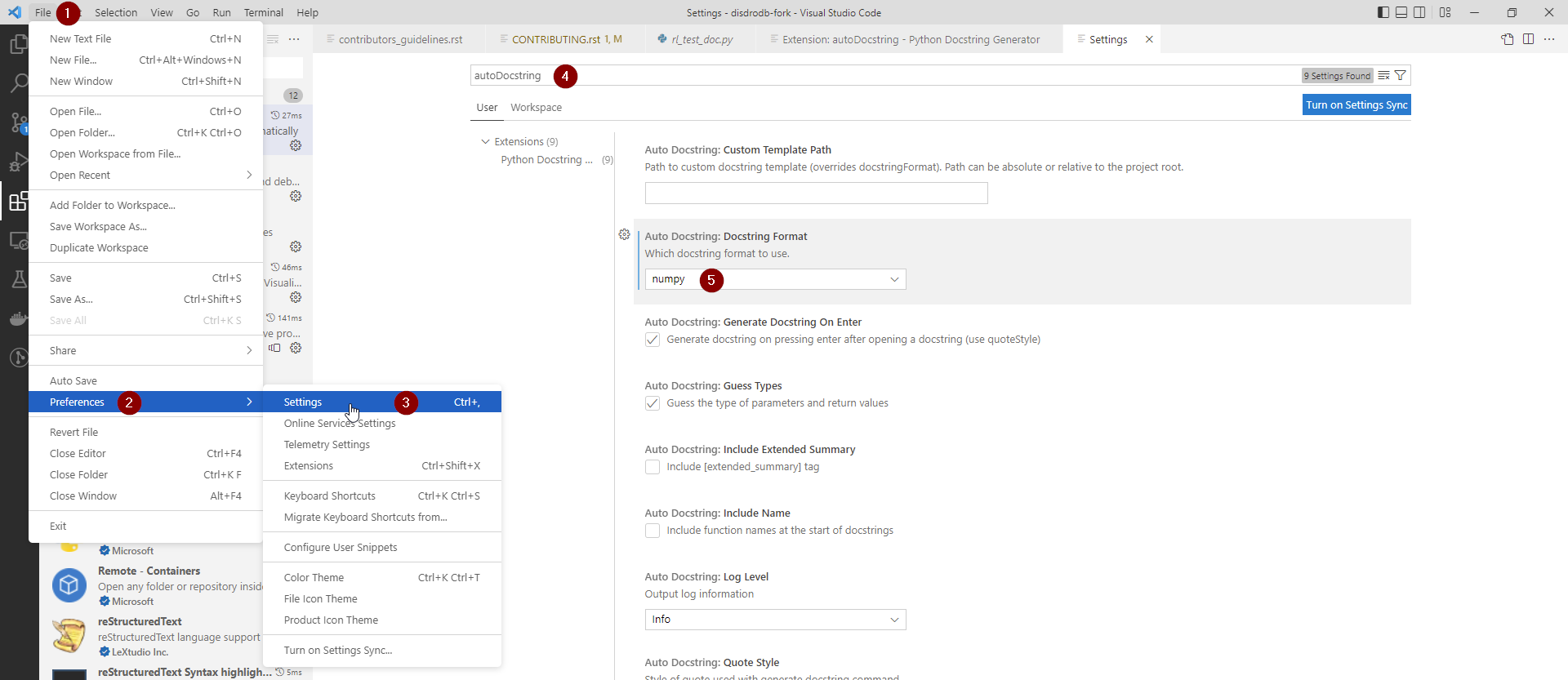
If you are using VS code, you can install the autoDocstring extension to automatically create such preformatted docstring.
You should configure VS code as follow :
Code quality control
To maintain a high code quality, Black and Ruff are defined in the .pre-commit-config.yaml file. These tools are run for every Pull Request on Github and can also be run locally.
Tool |
Aim |
pre-commit |
CI/CD |
Version |
|---|---|---|---|---|
Python code formatter |
👍 |
👍 |
22.8.0 |
|
Python linter |
👍 |
👍 |
0.0.2570 |
pre-commit
To run pre-commit (black + Ruff) locally :
pre-commit run --all-files
This is recommended since it indicates if the commit contained any formatting errors (that are automatically corrected).
Black
To run Black locally :
black .
Note
To maintain consistency, make sure to stick to the version defined in the .pre-commit-config.yaml file. This version will be used in the CI.
Ruff
To run Ruff locally :
ruff check .
Note
To maintain consistency, make sure to stick to the version and the rule configuration defined in the .pre-commit-config.yaml file. This information is used in the CI.
In the table below, some CI tool are mentioned for your information, but does not need to be installed on your computer. They are automatically run when you push your changes to the main repository via a GitHub Pull Request.
Tool |
Aim |
Python version |
|---|---|---|
Run pre-commit (as defined in .pre-commit-config.yaml ) |
||
Automated code review and analysis tools |
all versions according to GitHub workflow |
|
Automated code review and analysis tools |
? |
|
Automated code review and analysis tools |
? |
Code testing
Every code change must be tested !
Pytest
DISDRODB tests are written using the third-party pytest package.
The tests located in the disdrodb/tests folder are used to test various functions of the code and are automatically run when changes are pushed to the main repository through a GitHub Pull Request.
pytest disdrodb/tests
To create a new reader test, simply add a small, single-station dataset and the associated files (issue, metadata), and expected data, in the following manner:
A single test will run all readers with data that has been placed in the above-mentioned structure. The raw data will be processed, and the resulting Apache Parquet files (l0a) will be compared to the ground truth.
The reader test succeeds if both files (ground truth and transformation of the raw file) are similar.
The Continuous Integration (CI) on GitHub runs tests and analyzes code coverage. The following tools are used:
Tool |
Aim |
Version |
|---|---|---|
Execute unit tests and functional tests |
||
Coverage |
Measure the code coverage of the project’s unit tests |
all versions according to GitHub workflow |
Uses the “coverage” package to generate a code coverage report. |
all versions according to GitHub workflow |
|
Uses the “coverage” to track the quality of your code over time. |
all versions according to GitHub workflow |
Push your changes to your fork repository
During this process, pre-commit hooks will be run. Your commit will be allowed only if quality requirements are fulfilled.
If you encounter errors, Black and Ruff can be run using the following command:
pre-commit run --all-files
We follow a commit message convention, to have consistent git messages. The goal is to increase readability and ease of contribution. We use commit-lint
Create a new Pull Request in GitHub.
Once your code has been uploaded into your DISDRODB fork, you can create a Pull Request (PR) to the DISDRODB main branch.
Recommendation for the pull request
Add screenshots or GIFs for any UI changes. This will help the person reviewing your code to understand what you’ve changed and how it works.
Please use the pertinent template for the pull request, and fill it out accurately.
It’s OK to have multiple small commits as you work on the PR - GitHub will automatically squash it before merging.
If adding a new feature:
Add accompanying test case.
Provide a convincing reason to add this feature. Ideally, you should open a suggestion issue first and have it approved before working on it.
Present your issue in the ‘discussion’ part of this repo
If fixing bug:
If you are resolving a special issue, add
(fix #xxxx[,#xxxx])(#xxxx is the issue id) in your PR title for a better release log, e.g.update entities encoding/decoding (fix #3899).Provide a detailed description of the bug in the PR. Live demo preferred.
Add appropriate test coverage if applicable.
Code review checklist
Ask to people to review your code:
a person who knows the domain well and can spot bugs in the business logic;
an expert in the technologies you’re using who can help you improve the code quality.
When you’re done with the changes after a code review, do another self review of the code and write a comment to notify the reviewer, that the pull request is ready for another iteration.
Resolve all the review comments, making sure they are all addressed before another review iteration.
Make sure you don’t have similar issues anywhere else in your pull request.
If you’re not going to follow a code review recommendations, please add a comment explaining why you think the reviewer suggestion is not relevant.
Avoid writing comment like “done” of “fixed” on each code review comment. Reviewers assume you’ll do all suggested changes, unless you have a reason not to do some of them.
Sometimes it’s okay to postpone changes — in this case you’ll need to add a ticket number to the pull request and to the code itself.
Financial Contribution
We also welcome financial contributions. Please contact us directly.
Credits
Thank you to all the people who have already contributed to DISDRODB. repository!